Friday, April 17, 2020

Order of execution plan

Below reference clearly explains the order of execution plan.

http://www.dba-oracle.com/t_order_sequence_sql_execution_explain_plans_steps.htm


Cross verify results with below examples:

Example:
Query:
select /*+ gather_plan_statistics */
e.first_name,d.department_name,j.job_title,j.job_id
from
hr.employees e,
hr.departments d,
hr.jobs j
where
e.job_id=j.job_id
and e.department_id=d.department_id
and j.job_title in ('Purchasing Clerk','Marketing Manager','Administration Assistant')
--and e.first_name in ('Sigal','Alexander','Jennifer','Susan')
;
SELECT *  FROM  TABLE(DBMS_XPLAN.DISPLAY_CURSOR(null,null,'ALLSTATS LAST')) ;

Plan:
 Id    Operation                       Name          Starts   E-Rows   A-Rows     A-Time     Buffers    OMem    1Mem   Used-Mem 
0  SELECT STATEMENT                             1          7 00:00.0 19                           
*  1    HASH JOIN                                   1 17 7 00:00.0 19    880K    880K   629K (0)
2    NESTED LOOPS                               1          7 00:00.0 12                           
3     NESTED LOOPS                              1 17 7 00:00.0 9                           
*  4       TABLE ACCESS FULL           JOBS         1 3 3 00:00.0 7                           
*  5       INDEX RANGE SCAN            EMP_JOB_IX   3 6 7 00:00.0 2                           
6     TABLE ACCESS BY INDEX ROWID  EMPLOYEES    7 6 7 00:00.0 3                           
7    TABLE ACCESS FULL             DEPARTMENTS  1 27 27 00:00.0 7                           

order of id execution: 4,5,3,6,2,7,1,0

It follows "Left-Right-Center" at every node from leaf to top in tree.

It follows post order traversal. Refer this.
https://www.tutorialspoint.com/python_data_structure/python_tree_traversal_algorithms.htm

Viewing the actual explain plan of Query

step1: add /*+ gather_plan_statistics */ hint in select statement as shown below.

select /*+ gather_plan_statistics */
e.first_name,d.department_name,j.job_title,j.job_id
from
hr.employees e,
hr.departments d,
hr.jobs j
where
e.job_id=j.job_id
and e.department_id=d.department_id
and j.job_title in ('Purchasing Clerk','Marketing Manager','Administration Assistant')
--and e.first_name in ('Sigal','Alexander','Jennifer','Susan')
;


step2: execute
 SELECT *  FROM  TABLE(DBMS_XPLAN.DISPLAY_CURSOR(null,null,'ALLSTATS LAST')) ;
A-rows shows actually resulted query where as E-rows shows estimated row count.

Tuesday, January 8, 2019

Pivot, Unpivot in Oracle SQL


Below is a sample table.

select * from olympic_medal_winners;

Pivot: Convert rows to columns.

select * from (
select noc,medal from olympic_medal_winners)
pivot (
  count(*) for medal
  in ( 'Gold' Gold, 'Silver' Silver , 'Bronze'   Bronze)

)
order by 1 desc
fetch first 6 rows only;


Note: Always maintain pivot in outer most subquery with "select * from" clause.

Below is a query which results total events,sports, gender where gold , silver, bronze is won.

select * from (
 select noc, medal, sport, event, gender
 from   olympic_medal_winners
)
pivot (
 count(distinct sport ||'#'|| event ||'#'||gender )
 for medal in ( 'Gold' gold, 'Silver' silver, 'Bronze' bronze )
)
order  by 2 desc, 3 desc, 4 desc
fetch first 5 rows only;


Note: The outer grouping will occur only if that column is not used in Pivot braces. In above case sport,gender, event columns are used in Pivot braces() so, that wouldn't be grouped in result. Only NOC column is used to group.

Using multiple measure(count, sum) and filter pivoted data.

select * from (
  select noc, medal, sport, event, gender, athlete
  from   olympic_medal_winners
)
pivot  (
  count( distinct sport ||'#'|| event ||'#'|| gender ) medals,
  count( distinct sport ) sports,
  listagg( athlete, ',') within group (order by athlete) athletes
  for medal in ( 'Gold' gold )
)

where  noc like 'D%'


Unpivot: Convert Columns to rows.

Below is an another data set representing medals count.


select * from olympic_medal_tables


Below is an example of unpivoting the data.
select * from olympic_medal_tables
unpivot (medal_count for medal_colour in (
  gold_medals as 'GOLD',
  silver_medals as 'SILVER',
  bronze_medals as 'BRONZE'
))
order  by noc
fetch  first 6 rows only;

NOC  MEDAL_COLOUR  MEDAL_COUNT  
ALG  GOLD                                  0            
ALG  BRONZE                             0            
ALG  SILVER                                2            
ARG  GOLD                                  3            
ARG  BRONZE                             0            
ARG  SILVER                                1

Note: Observe that each column is denoted with a data set name GOLD, SILVER, BROZE etc to consider each of them in one column.

Generating Calendar using Connect Prior by


Note: Replace $Start_dt, $End_dt with the actual start,end dates


SELECT

            TO_CHAR(TO_DATE('$End_dt','MM/DD/YYYY HH24:MI:SS') - ROWNUM,'Day') DAY_NAME,

            TRUNC(TO_DATE('$End_dt','MM/DD/YYYY HH24:MI:SS') - ROWNUM) DAY_DT,

            TO_NUMBER(TO_CHAR(TO_DATE('$End_dt','MM/DD/YYYY HH24:MI:SS') - ROWNUM,'WW') ) CAL_WEEK_NUM,

            TRUNC(TO_DATE('$End_dt','MM/DD/YYYY HH24:MI:SS') - ROWNUM,'WW') CAL_WEEK_START_DT,

            TRUNC(TO_DATE('$End_dt','MM/DD/YYYY HH24:MI:SS') - ROWNUM,'WW') + 6 CAL_WEEK_END_DT,

            TO_NUMBER(TO_CHAR(TO_DATE('$End_dt','MM/DD/YYYY HH24:MI:SS') - ROWNUM,'DDD') ) CAL_DAY_OF_YEAR,

            TRUNC(TO_DATE('$End_dt','MM/DD/YYYY HH24:MI:SS') - ROWNUM) - TRUNC(TO_DATE('$End_dt','MM/DD/YYYY HH24:MI:SS') - ROWNUM,'Q'

) CAL_DAY_OF_QTR,

            TO_CHAR(TO_DATE('$End_dt','MM/DD/YYYY HH24:MI:SS') - ROWNUM,'DD') CAL_DAY_OF_MONTH,

            TO_CHAR(TO_DATE('$End_dt','MM/DD/YYYY HH24:MI:SS') - ROWNUM,'D') CAL_DAY_OF_WEEK

        FROM

            DUAL

        CONNECT BY

            ROWNUM <= TO_DATE('$End_dt','MM/DD/YYYY HH24:MI:SS') - TO_DATE('$Start_Dt','MM/DD/YYYY HH24:MI:SS')

        ORDER BY

            DAY_DT;

Monday, December 31, 2018

Gather stats of a table sytax

begin
DBMS_STATS.GATHER_TABLE_STATS('owner', 'table_name',
                                       estimate_percent=>50,
                                       block_sample=>TRUE,
                                       degree=>4) ;
end  ;

or
ANALYZE TABLE <table_name> ESTIMATE STATISTICS 1000 ROWS;

or
ANALYZE TABLE <table_name> ESTIMATE STATISTICS 50 PERCENT;

Monday, November 12, 2018

ERROR: "Internal error. The Source Qualifier [] contains an unbound field" while running a workflow in PowerCenter


Problem Description
While running a workflow in the PowerCenter, the following error message is displayed:

Internal error. The Source Qualifier [] contains an unbound field []. Contact Informatica Global Customer Support.

Cause
This issue occurs when there are one or more unconnected ports between the Source and Source Qualifier.

Solution
The error encountered is not a product bug. It can be overcome by good mapping design and usage.

Thursday, November 1, 2018

SQL to find Monday and Friday of the week of a given date

select next_day (sysdate-7,'FRIDAY') Last_Friday, next_day (sysdate-7, 'MONDAY') Last_Monday from dual;

Wednesday, October 10, 2018

Like Operation in expression transformation

To check if a sub string is present in a string like '%%' is used in SQL format. Equivalent regular expression informatica will be


REG_MATCH(Employee,'.*Be.*')


Employee Result

Beat                 TRUE

Bearo                 TRUE

Kartheek         FALSE

Deb                 FALSE

Tuesday, September 25, 2018

Meta data table to know DML operations on table

Use below table if you want to know recent updates, inserts or deletions into table.

ALL_TAB_MODIFICATIONS -describes tables accessible to the current user that have been
                                                     modified since the last time statistics were gathered on the tables

DBA_TAB_MODIFICATIONS - provides such information for all tables in the database.

USER_TAB_MODIFICATIONS- provides such information for tables owned by the current user

Tuesday, May 22, 2018

VI Command


To use vi: vi filename.      -->this is a command to open a file
To get insert mode of vi: i. -->enter i to change vi mode to insert for making changes to file
To enter vi command mode: [esc] Counts -->enter esc if you are done with changes in insert mode 
                                                                          and if u want to exit(you have to run below commands                                                                            for exiting after clicking esc)
To exit vi and save changes: ZZ or :wq. --> This is a command to close a file with saving
To exit vi without saving changes: :q!   -->This is a command to close a file with out saving


Monday, March 19, 2018

Query to delete duplicate records in oracle

delete from
   customer
where rowid in
 (select rowid from
   (select
     rowid,
     row_number()
    over
     (partition by custnbr order by custnbr) dup
    from customer)
  where dup > 1)

Wednesday, February 21, 2018

LISTAGG - Concatenate multiple rows into a single delimiter-separated string

It is a similar, though simpler, exercise to transpose data from rows to a comma-seperated list.

LISTAGG is a in-built function in Oracle that lets you concatenate multiple rows of data into a single delimiter-separated string. LISTAGG was introduced in Oracle 11G R2, before which one would use the circuitous MAX(SYS_CONNECT_BY_PATH) or STRAGG methods for the same result.

Here’s how LISTAGG works.

Using the standard departments and employees tables of HR schema: list the employees in a comma-separated list against each department they belong to.

The SQL:

SELECT deptno
     , LISTAGG(empno, ',')
         WITHIN GROUP (ORDER BY empno)
         AS emp
FROM   emp
GROUP BY deptno;
When executed:

SQL> SELECT deptno
  2       , LISTAGG(empno, ',')
  3           WITHIN GROUP (ORDER BY empno)
  4           AS emp
  5  FROM   emp
  6  GROUP BY deptno;

deptno emp
------------- ---------------------------------------
           10 200
           20 201,202
           30 114,115,116,117,118,119
           40 203
           50 120,121,122,123,124,125,126,127,128,129

Friday, January 19, 2018

Query to get DFF and Segment Values

SELECT ffv.descriptive_flexfield_name “DFF Name”,
ffv.application_table_name “Table Name”,
ffv.title “Title”,
ap.application_name “Application”,
ffc.descriptive_flex_context_code “Context Code”,
ffc.descriptive_flex_context_name “Context Name”,
ffc.description “Context Desc”,
ffc.enabled_flag “Context Enable Flag”,
att.column_seq_num “Segment Number”,
att.form_left_prompt “Segment Name”,
att.application_column_name “Column”,
fvs.flex_value_set_name “Value Set”,
att.display_flag “Displayed”,
att.enabled_flag “Enabled”,
att.required_flag “Required”

FROM apps.fnd_descriptive_flexs_vl ffv,
apps.fnd_descr_flex_contexts_vl ffc,
apps.fnd_descr_flex_col_usage_vl att,
apps.fnd_flex_value_sets fvs,
apps.fnd_application_vl ap

WHERE ffv.descriptive_flexfield_name = att.descriptive_flexfield_name
AND ap.application_id=ffv.application_id
AND ffv.descriptive_flexfield_name = ffc.descriptive_flexfield_name
AND ffv.application_id = ffc.application_id
AND ffc.descriptive_flex_context_code=att.descriptive_flex_context_code
AND fvs.flex_value_set_id=att.flex_value_set_id
AND ffv.title like ‘Give Title Name’
AND ffc.descriptive_flex_context_code like ‘Give Context Code Value’

ORDER BY att.column_seq_num

Thursday, November 16, 2017

Fusion BIP security

Ensure that the queries which you are building drive through one or more of the following views:

PER_POSITION_SECURED_LIST_V
PER_PUB_PERS_SECURED_LIST_V
CMP_SALARY_SECURED_LIST_V
PER_ASSIGNMENT_SECURED_LIST_V
PER_DEPARTMENT_SECURED_LIST_V
PER_JOB_SECURED_LIST_V
PER_LDG_SECURED_LIST_V
PER_LEGAL_EMPL_SECURED_LIST_V
PER_LOCATION_SECURED_LIST_V
PAY_PAYROLL_SECURED_LIST_V
PER_PERSON_SECURED_LIST_V
PER_GRADE_SECURED_LIST_V

Terminated Employees Details

SELECT PersonNamePEO.FULL_NAME "Full Name",
PersonDetailsPEO.person_number "Person Number",
  PPNF_MGR.full_name "Supervisor Full Name",
  TO_CHAR(PeriodOfServicePEO.ACTUAL_TERMINATION_DATE,'MM-DD-YYYY') "Actual Termination Date",
  JobTranslationPEO.name "Job Name",
  TO_CHAR(PersonPEO.start_date,'MM-DD-YYYY') "Date of Hire",
  HrLocation.location_code "Location Name",
  OrganizationUnitTranslationPEO.name "Organization Name",
  (
  SELECT TO_CHAR(MAX(perpos.date_start),'MM-DD-YYYY')
  FROM per_periods_of_service perpos,
    per_all_assignments_m perpaam
  WHERE perpos.person_id          =PersonDetailsPEO.person_id
  AND perpaam.period_of_service_id=perpos.period_of_service_id
  AND perpaam.person_id           =perpos.person_id
  AND perpaam.ACTION_CODE        IN('REHIRE','HIRE')
  AND perpaam.effective_end_date <=PeriodOfServicePEO.ACTUAL_TERMINATION_DATE
  ) "Latest Date of Hire",
  TO_CHAR(PeriodOfServicePEO.original_date_of_hire,'MM-DD-YYYY') "ORIGINAL_DATE_OF_HIRE",
  PeriodOfServicePEO.last_updated_by "Terminated By",
  TO_CHAR(PeriodOfServicePEO.last_update_date,'MM-DD-YYYY') "Termination Last Update Date",
  AssignmentPEO.assignment_number "Assignment Number",
  TO_CHAR(AssignmentPEO.effective_start_date,'MM-DD-YYYY') "Effective Start Date",
  TO_CHAR(AssignmentPEO.effective_end_date,'MM-DD-YYYY') "Effective End Date",
  PEA.EMAIL_ADDRESS,
  NVL(PART.ACTION_REASON,'No Reason') "Leaving Reason",
  NationalIdentifierPEO.NATIONAL_IDENTIFIER_NUMBER "Social Security Number"
FROM PER_PERSONS PersonPEO,
  PER_ALL_PEOPLE_F PersonDetailsPEO,
  PER_PERSON_NAMES_F_V PersonNamePEO,
  PER_ALL_ASSIGNMENTS_M AssignmentPEO,
  PER_PERSON_TYPES_TL PersonTypesTranslationPEO,
  PER_PERIODS_OF_SERVICE PeriodOfServicePEO,
  PER_NATIONAL_IDENTIFIERS NationalIdentifierPEO,
  HR_ORGANIZATION_UNITS_F_TL OrganizationUnitTranslationPEO,
  PER_JOBS_F_TL JobTranslationPEO,
  hr_locations_all HrLocation,
  PER_ACTION_REASONS_B PARB,
  PER_ACTION_REASONS_TL PART,
  per_assignment_supervisors_f PASF,
  per_person_names_f PPNF_MGR,
  PER_EMAIL_ADDRESSES PEA,
  PER_ACTIONS_B ActionsPEO,
  HR_ORGANIZATION_UNITS_F_TL GRETranslationPEO,
  HR_ORGANIZATION_UNITS_F_TL BUTranslationPEO,
  hr_all_positions_f_tl PosiTL,
  PER_PERSON_SECURED_LIST_V PPSLV
WHERE PersonPEO.PERSON_ID                    = PersonDetailsPEO.PERSON_ID
AND PersonPEO.PERSON_ID                      = PersonNamePEO.PERSON_ID
AND PersonPEO.PERSON_ID                      = AssignmentPEO.PERSON_ID
AND AssignmentPEO.PERSON_TYPE_ID             = PersonTypesTranslationPEO.PERSON_TYPE_ID(+)
AND (USERENV('LANG'))                        = PersonTypesTranslationPEO.LANGUAGE
AND AssignmentPEO.PERIOD_OF_SERVICE_ID       = PeriodOfServicePEO.PERIOD_OF_SERVICE_ID(+)
AND AssignmentPEO.PERSON_ID                  = PeriodOfServicePEO.PERSON_ID(+)
AND PersonDetailsPEO.PERSON_ID               = NationalIdentifierPEO.PERSON_ID(+)
AND PersonDetailsPEO.PRIMARY_NID_ID          = NationalIdentifierPEO.NATIONAL_IDENTIFIER_ID(+)
AND ( (AssignmentPEO.EFFECTIVE_LATEST_CHANGE = 'Y' ) )
AND ( (AssignmentPEO.ASSIGNMENT_TYPE        IN ('E','C' ,'N','P') ))
AND AssignmentPEO.organization_id            = OrganizationUnitTranslationPEO.ORGANIZATION_ID(+)
AND (USERENV('LANG'))                        = OrganizationUnitTranslationPEO.LANGUAGE(+)
AND AssignmentPEO.JOB_ID                     = JobTranslationPEO.JOB_ID(+)
AND (USERENV('LANG'))                        = JobTranslationPEO.LANGUAGE(+)
AND HrLocation.location_id(+)                =AssignmentPEO.location_id

AND ( sysdate BETWEEN PersonDetailsPEO.EFFECTIVE_START_DATE AND PersonDetailsPEO.EFFECTIVE_END_DATE)
AND ( sysdate BETWEEN PersonNamePEO.EFFECTIVE_START_DATE AND PersonNamePEO.EFFECTIVE_END_DATE)
AND ( sysdate BETWEEN AssignmentPEO.EFFECTIVE_START_DATE AND AssignmentPEO.EFFECTIVE_END_DATE)
AND ( sysdate BETWEEN OrganizationUnitTranslationPEO.EFFECTIVE_START_DATE(+) AND OrganizationUnitTranslationPEO.EFFECTIVE_END_DATE(+))
AND ( sysdate BETWEEN JobTranslationPEO.EFFECTIVE_START_DATE(+) AND JobTranslationPEO.EFFECTIVE_END_DATE(+))

AND PARB.ACTION_REASON_ID        = PART.ACTION_REASON_ID(+)
AND AssignmentPEO.REASON_CODE    = PARB.ACTION_REASON_CODE(+)
AND PART.language(+)             ='US'
AND PeriodOfServicePEO.person_id = PASF.person_id(+)
AND PeriodOfServicePEO.ACTUAL_TERMINATION_DATE BETWEEN PASF.effective_start_date(+) AND PASF.effective_end_date(+)
AND PASF.manager_type(+) = 'LINE_MANAGER'
AND PASF.manager_id      = PPNF_MGR.person_id(+)
AND TRUNC(SYSDATE) BETWEEN TRUNC(PPNF_MGR.effective_start_date(+)) AND TRUNC(PPNF_MGR.effective_end_date(+))
AND PPNF_MGR.name_type(+)             = 'GLOBAL'
AND PersonDetailsPEO.primary_email_id = PEA.email_address_id(+)
AND AssignmentPEO.ACTION_CODE         = ActionsPEO.ACTION_CODE(+)
AND AssignmentPEO.BUSINESS_GROUP_ID   =ActionsPEO.BUSINESS_GROUP_ID(+)

AND ActionsPEO.ACTION_TYPE_CODE   = 'EMPL_TERMINATE'
AND AssignmentPEO.legal_entity_id =GRETranslationPEO.ORGANIZATION_ID(+)
AND ( sysdate BETWEEN GRETranslationPEO.EFFECTIVE_START_DATE(+) AND GRETranslationPEO.EFFECTIVE_END_DATE(+))
AND GRETranslationPEO.language(+) ='US'
AND AssignmentPEO.Business_unit_id=BUTranslationPEO.ORGANIZATION_ID(+)
AND ( sysdate BETWEEN BUTranslationPEO.EFFECTIVE_START_DATE(+) AND BUTranslationPEO.EFFECTIVE_END_DATE(+))
AND BUTranslationPEO.language(+)='US'
AND AssignmentPEO.position_id   =PosiTL.position_id(+)
AND (USERENV('LANG'))           = PosiTL.LANGUAGE(+)
AND AssignmentPEO.PERSON_ID     = PPSLV.PERSON_ID
AND PeriodOfServicePEO.ACTUAL_TERMINATION_DATE BETWEEN PPSLV.EFFECTIVE_START_DATE AND PPSLV.EFFECTIVE_END_DATE

AND PeriodOfServicePEO.ACTUAL_TERMINATION_DATE >= (:p_from_date)
AND PeriodOfServicePEO.ACTUAL_TERMINATION_DATE <= (:p_to_date)

Employee Deduction Details


  SELECT PersonDetailsPEO.person_id,
          PersonNamePEO.full_name,
          PersonDetailsPEO.PERSON_NUMBER ,
          AssignmentPEO.assignment_number,
          NationalIdentifierPEO.NATIONAL_IDENTIFIER_NUMBER,
          JobTranslationPEO.name AS JOB_NAME,
          GRETranslationPEO.name as GRE,
          OrganizationUnitTranslationPEO.Name  AS ORG_NAME,
          HRLocationTL.location_name,
          SupervisorNamePEO.full_name AS SUP_NAME,
          BUTranslationPEO.name       AS BU_Name ,
          PosiTL.name                 AS POS_Name,
          BalanceCategoriesPEO.BASE_CATEGORY_NAME,
          PayrollActionPEO.effective_date,
          PayrollActionPEO.date_earned,
          PayrollDPEO.payroll_name,
          TimePeriodPEO.END_DATE,
          TimePeriodPEO.START_DATE,
          BalanceTypesPEO.BALANCE_NAME as ELEMENT_NAME,
          BalanceTypesPEO.CURRENCY_CODE,
          sum(PayrollBalancesPEO.balance_value) PTD_Balance
         
        FROM PAY_RUN_BALANCES PayrollBalancesPEO,
          PAY_PAY_RELATIONSHIPS_DN PayrollRelationshipPEO,
          PAY_PAYROLL_REL_ACTIONS PayrollRelationshipActionPEO,
          PAY_PAYROLL_ACTIONS PayrollActionPEO,
          PER_ALL_ASSIGNMENTS_F AssignmentPEO,
          PAY_REL_GROUPS_DN PRG,
          PER_ALL_PEOPLE_F PersonDetailsPEO,
          PAY_DEFINED_BALANCES DefinedBalancesPEO,
          PAY_BALANCE_DIMENSIONS BalanceDimensionsPEO,
          PAY_TIME_PERIODS TimePeriodPEO,
          PAY_BALANCE_TYPES_VL BalanceTypesPEO,
          PAY_BALANCE_CATEGORIES_VL BalanceCategoriesPEO,
          PER_PERSON_NAMES_F_V PersonNamePEO,
          PER_NATIONAL_IDENTIFIERS NationalIdentifierPEO,
          PAY_ALL_PAYROLLS_F PayrollDPEO,
          PER_JOBS_F_TL JobTranslationPEO,
          HR_ORGANIZATION_UNITS_F_TL OrganizationUnitTranslationPEO,
          HR_ORGANIZATION_UNITS_F_TL GRETranslationPEO,
          PER_LOCATION_DETAILS_F HRLocation,
          PER_LOCATION_DETAILS_F_TL HRLocationTL,
          PER_PERSON_NAMES_F_V SupervisorNamePEO,
          HR_ORGANIZATION_UNITS_F_TL BUTranslationPEO,
          --hr_all_positions_f_tl PosiTL,
          PER_ASSIGNMENT_SUPERVISORS_F AssignmentSupervisorPEO,
          PER_PERSON_SECURED_LIST_V PPSLV
        WHERE NVL(PayrollBalancesPEO.payroll_rel_action_id,0)=PayrollRelationshipActionPEO.payroll_rel_action_id
        AND PayrollRelationshipActionPEO.payroll_action_id   =PayrollActionPEO.payroll_action_id
        AND PayrollBalancesPEO.payroll_relationship_id       = PayrollRelationshipPEO.payroll_relationship_id (+)
        AND PayrollRelationshipPEO.person_id                 = AssignmentPEO.person_id
        AND PayrollActionPEO.effective_date BETWEEN AssignmentPEO.effective_start_date AND AssignmentPEO.effective_end_date
        AND PRG.relationship_group_id (+)=PayrollBalancesPEO.payroll_assignment_id
        and AssignmentPEO.ASSIGNMENT_TYPE        in ( 'E','C','N','P')
        and AssignmentPEO.person_id=PersonDetailsPEO.person_id
        AND sysdate between PersonDetailsPEO.effective_start_date and PersonDetailsPEO.effective_end_date
        AND DefinedBalancesPEO.BALANCE_DIMENSION_ID     = BalanceDimensionsPEO.BALANCE_DIMENSION_ID
        AND PayrollBalancesPEO.DEFINED_BALANCE_ID      = DefinedBalancesPEO.DEFINED_BALANCE_ID
        AND PayrollActionPEO.PAYROLL_ID              = TimePeriodPEO.PAYROLL_ID
        AND PayrollActionPEO.EFFECTIVE_DATE between TimePeriodPEO.START_DATE and TimePeriodPEO.END_DATE
        AND DefinedBalancesPEO.BALANCE_TYPE_ID          = BalanceTypesPEO.BALANCE_TYPE_ID
        AND BalanceTypesPEO.BALANCE_CATEGORY_ID     = BalanceCategoriesPEO.BALANCE_CATEGORY_ID
        AND PayrollRelationshipActionPEO.source_id is null
        AND AssignmentPEO.PERSON_ID    = PersonNamePEO.PERSON_ID(+)
        AND PersonNamePEO.name_type(+) = 'GLOBAL'
        AND ( sysdate BETWEEN PersonNamePEO.EFFECTIVE_START_DATE(+) AND PersonNamePEO.EFFECTIVE_END_DATE(+))
        AND PersonDetailsPEO.PERSON_ID           = NationalIdentifierPEO.PERSON_ID(+)
        AND PersonDetailsPEO.PRIMARY_NID_ID      = NationalIdentifierPEO.NATIONAL_IDENTIFIER_ID(+)
        AND PayrollActionPEO.PAYROLL_ID                = PayrollDPEO.PAYROLL_ID
        AND PayrollActionPEO.EFFECTIVE_DATE BETWEEN PayrollDPEO.EFFECTIVE_START_DATE AND PayrollDPEO.EFFECTIVE_END_DATE
        AND AssignmentPEO.JOB_ID                 = JobTranslationPEO.JOB_ID(+)
        AND (USERENV('LANG'))                    = JobTranslationPEO.LANGUAGE(+)
        AND ( sysdate BETWEEN JobTranslationPEO.EFFECTIVE_START_DATE(+) AND JobTranslationPEO.EFFECTIVE_END_DATE(+))
            AND AssignmentPEO.organization_id=OrganizationUnitTranslationPEO.ORGANIZATION_ID(+)
        AND ( sysdate BETWEEN OrganizationUnitTranslationPEO.EFFECTIVE_START_DATE(+) AND OrganizationUnitTranslationPEO.EFFECTIVE_END_DATE(+))
        AND OrganizationUnitTranslationPEO.language(+)='US'
        AND AssignmentPEO.legal_entity_id             =GRETranslationPEO.ORGANIZATION_ID(+)
        AND ( sysdate BETWEEN GRETranslationPEO.EFFECTIVE_START_DATE(+) AND GRETranslationPEO.EFFECTIVE_END_DATE(+))
        AND GRETranslationPEO.language(+)   ='US'
        AND AssignmentPEO.location_id       =HRLocation.location_id(+)
        AND HRLocation.LOCATION_DETAILS_ID  = HRLocationTL.LOCATION_DETAILS_ID(+)
        AND HRLocationTL.LANGUAGE(+)        = USERENV('LANG')
        AND HRLocation.EFFECTIVE_START_DATE = HRLocationTL.EFFECTIVE_START_DATE
        AND HRLocation.EFFECTIVE_END_DATE   = HRLocationTL.EFFECTIVE_END_DATE
        AND sysdate BETWEEN HRLocation.EFFECTIVE_START_DATE(+) AND HRLocation.EFFECTIVE_END_DATE(+)
          AND AssignmentSupervisorPEO.MANAGER_ID = SupervisorNamePEO.PERSON_ID(+)
        AND SupervisorNamePEO.name_type(+)     = 'GLOBAL'
        AND ( sysdate BETWEEN SupervisorNamePEO.EFFECTIVE_START_DATE(+) AND SupervisorNamePEO.EFFECTIVE_END_DATE(+))
            AND AssignmentPEO.Business_unit_id=BUTranslationPEO.ORGANIZATION_ID(+)
        AND ( sysdate BETWEEN BUTranslationPEO.EFFECTIVE_START_DATE(+) AND BUTranslationPEO.EFFECTIVE_END_DATE(+))
        AND BUTranslationPEO.language(+)='US'
        --AND AssignmentPEO.position_id   =PosiTL.position_id(+)
        --AND (USERENV('LANG'))           = PosiTL.LANGUAGE(+)
        AND AssignmentPEO.PERSON_ID = PPSLV.PERSON_ID
        AND sysdate BETWEEN PPSLV.effective_start_date AND PPSLV.effective_end_date
        AND AssignmentPEO.ASSIGNMENT_ID        = AssignmentSupervisorPEO.ASSIGNMENT_ID(+)
        AND ('LINE_MANAGER')                   = AssignmentSupervisorPEO.MANAGER_TYPE(+)
        AND ( sysdate BETWEEN AssignmentSupervisorPEO.EFFECTIVE_START_DATE(+) AND AssignmentSupervisorPEO.EFFECTIVE_END_DATE(+))
       
        AND ( (BalanceDimensionsPEO.PERIOD_TYPE          = 'RUN' ) )
        and TimePeriodPEO.STATUS             = 'O'
        AND AssignmentPEO.primary_flag              ='Y'
        AND (AssignmentPEO.assignment_status_type  = 'ACTIVE')
       
  --Pass the list of categories you want to list results for     
        AND BalanceCategoriesPEO.BASE_CATEGORY_NAME in ('Pre-Statutory Deductions','Voluntary Deductions',
       'Total Tax Deductions','Social Insurance Deductions','Involuntary Deductions')
  -- Pass the list of dimensions that you want to result
        AND  BalanceDimensionsPEO.BASE_DIMENSION_NAME  in
( 'Core Relationship No Calculation Breakdown, Tax Unit Run')
  -- pass the Person number below   
    and (PersonDetailsPEO.PERSON_NUMBER        IN (:p_person_number)
        OR 'All'           IN (:p_person_number
       ||'All'))
   --Pass check date for which you want to view data     
       and PayrollActionPEO.effective_date<=:p_to_date
group by
        PersonDetailsPEO.person_id,
          PersonDetailsPEO.PERSON_NUMBER ,
          AssignmentPEO.assignment_number,
          NationalIdentifierPEO.NATIONAL_IDENTIFIER_NUMBER,
          BalanceCategoriesPEO.BASE_CATEGORY_NAME,
          PayrollActionPEO.effective_date,
          PayrollActionPEO.date_earned,
          PayrollDPEO.payroll_name,
          TimePeriodPEO.END_DATE,
          TimePeriodPEO.START_DATE,
          SupervisorNamePEO.full_name ,
          BUTranslationPEO.name       ,
          PosiTL.name               ,
          BalanceTypesPEO.BALANCE_NAME,
          BalanceTypesPEO.CURRENCY_CODE,
          PersonNamePEO.full_name ,
          JobTranslationPEO.name,
          GRETranslationPEO.name,
          OrganizationUnitTranslationPEO.Name,
          HRLocationTL.location_name
          

Monday, November 6, 2017

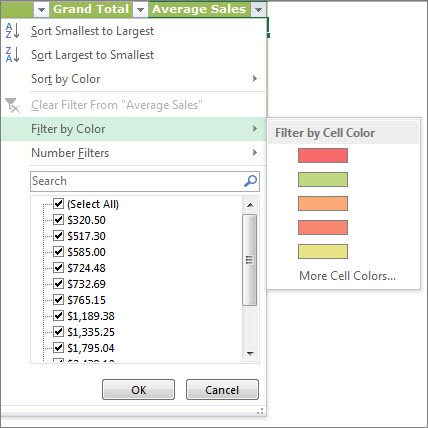
Filter items by color

If you've applied different cell or font colors or a conditional format, you can filter by the colors or icons that are shown in your table.

  1. Click the arrow Filter drop-down arrow in the table header of the column that has color formatting or conditional formatting applied.
  2. Click Filter by Color and then pick the cell color, font color, or icon you want to filter by.
    Filter by Color options
    The types of color options you’ll have available depend on the types of format you have applied.

Wednesday, July 26, 2017

Security Roles In OBIEE11g


Hi All,

By Default OBIEE11g provided the 3 default roles.

BI Consumer.
BI Author.
BI Administrator.

 Let's see the deference's.

1.BI Consumer: The base-level role that grants the user access to existing analyses, dashboards and agents, allows them to run or schedule existing BI Publisher reports, but not create any new ones. The Consumer can only view and run existing dashboards, analysis and reports provided to them. These objects will be published in a shared area with proper security rights. Consumers typically are the broadest user base across the institution.

2. BI Author: A role that is also recursively granted the Bi Consumer role that also allows users to create new analyses, dashboards and other BI objects. The Author can create and edit dashboards, analyses and reports. Authors will include a narrower user base than Consumers.

3. BI Administrator: Recursively granted the BIAuthor (and therefore BIConsumer) roles that allows the user to administer all parts of the system, including modifying catalog permissions and privilege. The Administrator can edit and create new repositories and catalogs. They also have full control over all aspects of the OBIEE tool suite.

OBIEE Security Groups
These roles correspond to a set of LDAP groups within the embedded Weblogic Server LDAP Server that have almost the same names (plural rather than singular) as these application roles:

1. BIConsumers 
2. BIAuthors 
3. BIAdministrators 

It’s these LDAP groups that you assign users to, not application roles, with Fusion Middleware then mapping these LDAP groups into their corresponding application roles. Later on, we’ll look at how and why you might want to create another LDAP group and corresponding application role like these, which we’ll call BIAnalyst; for now though, let’s look at how you create a new user and grant them one of the existing roles.

Monday, July 3, 2017

EBS Query to get segment structure description of an Chart of Account Code


SELECT
ST.ID_FLEX_STRUCTURE_CODE  "Chart of Account Code"
,SG.ID_FLEX_NUM            "Chart of Account Num"
,SG.SEGMENT_NAME               "Segment Name"
,SG.APPLICATION_COLUMN_NAME    "Column Name"
,SG.FLEX_VALUE_SET_ID          "Value Set Id"
,VS.FLEX_VALUE_SET_NAME
FROM
FND_ID_FLEX_STRUCTURES ST
INNER JOIN FND_ID_FLEX_SEGMENTS SG ON ST.APPLICATION_ID = SG.APPLICATION_ID AND ST.ID_FLEX_CODE = SG.ID_FLEX_CODE AND ST.ID_FLEX_NUM = SG.ID_FLEX_NUM
INNER JOIN FND_FLEX_VALUE_SETS VS ON SG.FLEX_VALUE_SET_ID = VS.FLEX_VALUE_SET_ID
LEFT OUTER JOIN FND_ID_FLEX_SEGMENTS SG1 ON VS.PARENT_FLEX_VALUE_SET_ID = SG1.FLEX_VALUE_SET_ID AND SG.ID_FLEX_NUM = SG1.ID_FLEX_NUM AND SG.APPLICATION_ID = SG1.APPLICATION_ID AND SG.ID_FLEX_CODE = SG1.ID_FLEX_CODE
WHERE
ST.APPLICATION_ID = 101
AND ST.ID_FLEX_CODE = 'GL#'
AND ST.ENABLED_FLAG = 'Y'
and SG.ID_FLEX_NUM =101
ORDER BY 1,2,3;