Thursday, October 27, 2016

Grand Total in BI Publisher or RTF Templeate

By using below function you can get grand total
<?sum(//CF_AMT_CHILD[.!=''])?>

Monday, October 17, 2016

Query : Invoices on hold

select distinct
ai.invoice_num,ai.invoice_amount,ai.invoice_date
,ai.invoice_received_date,ah.hold_lookup_code,ah.hold_reason,pv.vendor_name,pv.segment1 vendor_number
,ph.segment1 po_number
,gcc.segment1||’.’||gcc.segment2||’.’||gcc.segment3||’.’||gcc.segment4||’.’||gcc.segment5||’.’||gcc.segment6
–,aid.AMOUNT
from ap_invoices_all ai
,ap_holds_all ah
,po_vendors pv
,po_headers_all ph
,ap_invoice_distributions_all aid
,po_distributions_all pda
,gl_code_combinations gcc
where 1=1
and ai.invoice_id = ah.invoice_id
and ai.vendor_id = pv.vendor_id
–and ai.po_header_id = ph.po_header_id(+)
and ph.PO_HEADER_ID = pda.PO_HEADER_ID
and ah.invoice_id = aid.invoice_id
and aid.po_distribution_id = pda.po_distribution_id
and aid.dist_code_combination_id = gcc.code_combination_id

Friday, October 14, 2016

GL source_id_int_1 Mappings

The source_id_int_1 on the xla_transaction_entities table can be used to join from SLA to related transactions in the sub-ledgers.
There is a very useful table called xla_entity_id_mappings which contains the mapping information.
This covers the mappings used for some common transaction types:
APPLICATION_ID
APPLICATION_NAME ENTITY_CODE SOURCE_ID_COL_NAME_1 TRANSACTION_ID_COL_NAME_1 SOURCE_ID_COL_NAME_2 TRANSACTION_ID_COL_NAME_2
200
Payables AP_INVOICES SOURCE_ID_INT_1 INVOICE_ID    
200
Payables AP_PAYMENTS SOURCE_ID_INT_1 CHECK_ID    
275
Projects BUDGETS SOURCE_ID_INT_1 BUDGET_VERSION_ID    
275
Projects EXPENDITURES SOURCE_ID_INT_1 EXPENDITURE_ITEM_ID    
275
Projects REVENUE SOURCE_ID_INT_1 PROJECT_ID SOURCE_ID_INT_2 DRAFT_REVENUE_NUM
201
Purchasing PURCHASE_ORDER SOURCE_ID_INT_1 PO_HEADER_ID    
201
Purchasing REQUISITION SOURCE_ID_INT_1 REQ_ID    
222
Receivables RECEIPTS SOURCE_ID_INT_1 CASH_RECEIPT_ID    
222
Receivables TRANSACTIONS SOURCE_ID_INT_1 CUSTOMER_TRX_ID    
For example, for a Revenue in Projects, you could see that accounting info that flows from Projects through to GL would have and source_id_int_1 value related to the PROJECT_ID and a source_id_int_2 value related to the DRAFT_REVENUE_NUM.
Having access to the xla_entity_id_mappings helps take the guess work out of linking source transactions to the sub ledger tables.
-- ##############################################################################
--       SOURCE_ID_INT_1 MAPPINGS
-- ############################################################################*/
     
-- source_id_int_1 mappings
-- for a given application, find out what entity (e.g. AP_INVOICES) and column_name (e.g. INVOICE_ID)
-- found via Application Diagnostics > Subledger Accounting > Setup Diagnostics > Xla Setup Diagnostics Diagnostics Script
 
    SELECT fa.application_id
         , fa.application_short_name app
         , fat.application_name
         , DECODE(fpi.status,'I','Licensed','S','Shared','N','Not Licensed') status
         , fpi.product_version
         , fpi.patch_level
         , xeim.entity_code
         , xeim.source_id_col_name_1
         , xeim.transaction_id_col_name_1
         , xeim.source_id_col_name_2
         , xeim.transaction_id_col_name_2
         , xeim.source_id_col_name_3
         , xeim.transaction_id_col_name_3
         , xeim.source_id_col_name_4
         , xeim.transaction_id_col_name_4
      FROM xla.xla_entity_id_mappings xeim
      JOIN applsys.fnd_application fa ON xeim.application_id = fa.application_id
      JOIN applsys.fnd_application_tl fat ON fa.application_id = fat.application_id
 LEFT JOIN applsys.fnd_product_installations fpi ON fpi.application_id = fa.application_id
     WHERE 1 = 1
       AND xeim.source_id_col_name_1 IS NOT NULL
--       AND fpi.status <> 'N'
  ORDER BY fat.application_name
         , xeim.entity_code;

Sunday, October 9, 2016

LOG Levels in Oracle Data Integrator


     List of LOG Levels in Oracle Data Integrator


    0=>  No Log  
   
    1=>  Displays the start and end of each session

    2=>Displays level 1 and the start and end of each step

    3=>Displays level 2 and each task executed

    4=>Displays the SQL queries executed, as well as level 3

    5=>A complete trace, inclueds level 4
   
    6=> Log level 6 has the same behavior as log level 5, but with the addition of variable tracking while
           execution or restarting  jobs.

Saturday, October 8, 2016

ODI getSession object parameters usage.


We can find below listed parameters for odiRef.getSession  method parameters.


SESS_NO
Internal number of the session
SESS_NAME
Name of the session
SCEN_VERSION
Current scenario version
CONTEXT_NAME
Name of the execution context
CONTEXT_CODE
Code of the execution context
AGENT_NAME
Name of the physical agent in charge of the execution
SESS_BEG
Date and time of the beginning of the session
USER_NAME
odi User running the session.

Examples


The current session Number is: <%=odiRef.getSession("SESS_NO")%>
The current User is: <%=odiRef.getSession("USER_NAME")%>
The current Session Name is: <%=odiRef.getSession("SESS_NAME")%>
The current agent name is: <%=odiRef.getSession("AGENT_NAME")%>

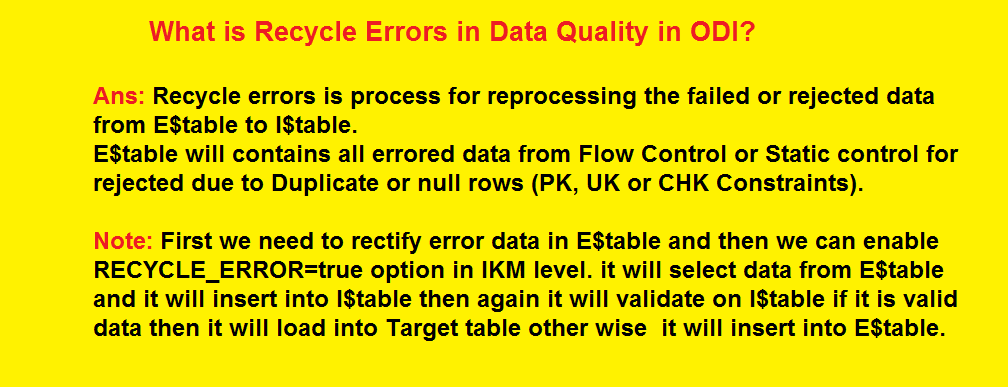
What is Flow Control and Static Control and Recycle Errors in Oracle Data Integrator?


What is Flow Control and Static Control and Recycle Errors in Oracle Data Integrator?


Friday, October 7, 2016

Setting Priority Group Numbers for Logical Table Sources


You can set priority group numbers to determine which logical table source should be used for queries for which there is more than one logical table source that can satisfy the requested set of columns.

For Example , A column is mapped to multiple LTS(LTS1 & LTS2)  and you want to give first priority to LTS1 whenever this particular column is being fetched in the report so in this case you can assign a higher priority to LTS1.

To assign priority group numbers, rank your logical table sources in numeric order, with 0 being the highest-priority source and so on.
Assigning priority groups is optional. All logical table sources are set to priority 0 by default.

See below snapshot: