Wednesday, April 15, 2015

Query to Check Concurrent Manager Status

Below mentioned is the query to check concurrent manager status in Oracle APPS.

SELECT DECODE(CONCURRENT_QUEUE_NAME,'FNDICM','Internal Manager','FNDCRM','Conflict Resolution Manager','STANDARD','Standard Manager' ) AS "Concurrent Manager's Name",
max_processes  AS "TARGET Processes",
running_processes AS "ACTUAL Processes"
FROM apps.fnd_concurrent_queues
WHERE CONCURRENT_QUEUE_NAME IN ('FNDICM','FNDCRM','STANDARD');


If status of target process and actual process is non-zero then our concurrent manager is up and running.

Sunday, April 12, 2015

SQL script to find Scheduled Concurrent Programs

Run the following script to find Scheduled Concurrent Programs and its frequency

SELECT *
    FROM apps.FND_CONC_REQ_SUMMARY_V
   WHERE     phase_code = 'P'
         AND status_code IN ('I', 'Q')
         AND (NVL (request_type, 'X') != 'S')
         AND requested_start_date >= SYSDATE
ORDER BY program_short_name DESC;
  • PHASE_CODE status P stands for Pending
  • STATUS_CODE status I stands for Normal & status Q stands of Standby
  • Request_type != 'S' condition is to disallow Request Set Stage programs

Tuesday, April 7, 2015

Entering a customer in Oracle apps R12

Use Order Management Super User, Vision Operations (USA)
(N) Order Management > Customers > Standard
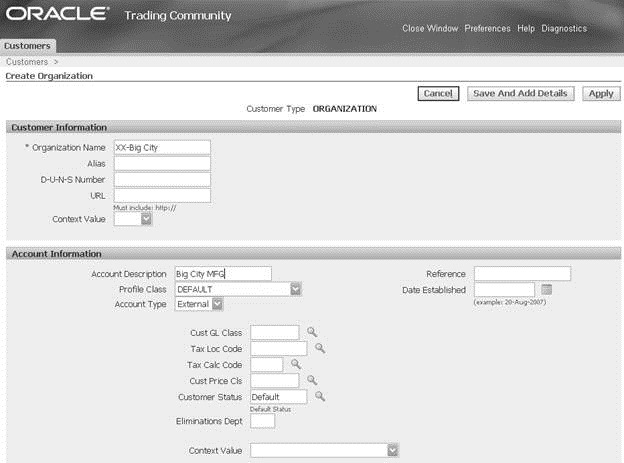
1. (B) Create.
2. Organization Name: XX-Big City. Leave Alias, D-U-N-S Number, URL, and Context Value.
3. Account Description: Enter a description for your customer.
4. Profile Class: Default.
5. Account Type: External. Leave all other fields, in the Account Information region, blank.
clip_image002
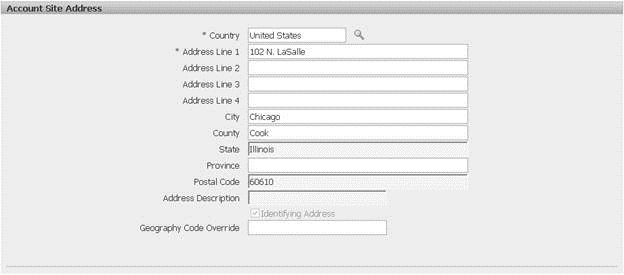
6. Country: United States.
7. Address Line 1: 102 N. LaSalle.
8. City: Chicago.
9. County: Cook
10. State: Illinois.
11. Postal Code: 60610. Leave all other fields, in the Account Site Address region, blank.
clip_image004
12. In the Business Purpose region, set Purpose to Bill To and check the Primary check box.
13. (B) Apply.
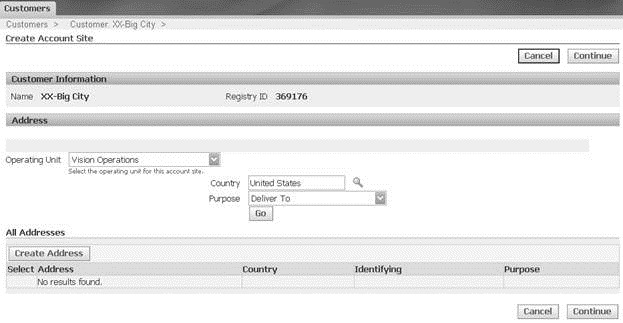
14. (B) Create Site.
15. Country: United States.
16. Purpose: Deliver To.
clip_image006
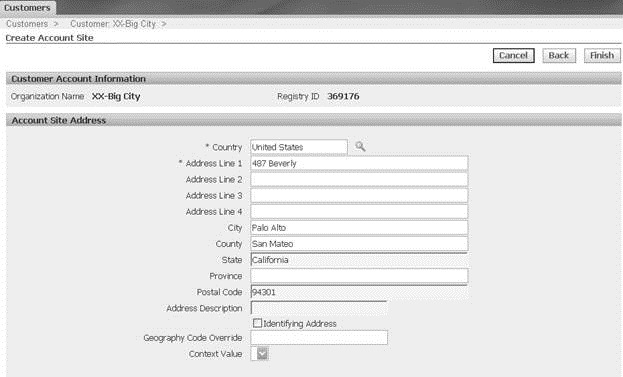
17. (B) Create Address.
18. Address Line 1: 487 Beverly.
19. City: Palo Alto.
20. County: San Mateo.
21. State: California.
22. Postal Code: 94301.
Leave all other fields, in the Account Site Address region, blank.
clip_image008
23. In the Business Purpose region, set Purpose to Deliver To and leave the Primary check box unchecked.
24. (B) Apply.
NOTE:
If you get any error like "please enter valid city, county, state" when you save it.you will get suggestions for address please use it and save it. This is because we have to enter valid details.

OBIEE11g: How to insert or Display or Show a Dashboard inside another Dashboard


The easy way to do it is using the dashboard object "Embedded Content".

From the properties of the Embedded content we all know that it is useful for displaying any web content in the obiee environment (dashboards). The general scenarios are displaying the clients website or displaying the client email login pages etc.... The new point is we can use the same to display one dashboard inside the another dashboard. If we understand the functionality of the dashboard we can say a dashboard is also a webpage which will have some url so simply by adding this dashboard URL to the embedded content we can achieve this. Follow the screenshots to understand better....

Requirement: In my case i have two dashboards "Demo Dashboard" and "Sales Analytics". I want to display Sales Analytics inside the Demo dashboard.

Step 1:

Open the Sales Analytics Dashboard (click on the dashboards and select the sales analytics)


Step 2: Copy the URL of that page

Step 3: Now go to the Demo Dashboards

 Step 4: Click on the Edit Dashboard

Step 5: Add the Embedded content object (drag and drop embedded content from left window to right)
Step 6: Click on the edit properties of the embedded content
Step 7: Now paste the URL of the Sales Analytics dashboard in the URL section
If you want you can adjust the width and hight. I have changed them as per my requirement.
Step 8: Now save the dashboard and run the same, You can see Sales Analytics dashboard is displayed inside the Demo dashboard

Sunday, April 5, 2015

How to Define Operating Unit in R12

 Define Operating Unit.

An organization that uses Oracle subledgers, such as Oracle Cash Management, Order Management and Shipping Execution, Oracle Payables, Oracle Purchasing, Oracle Receivables, and related products. It may be a sales office, a division, or a department. Operating units are not associated with legal entities. Operating units are assigned to ledgers and a default legal context. Information is secured by operating unit for these applications using responsibilities. Each user can access, process, and report on data only for the operating units assigned to the MO: Operating Unit or MO: Security Profile profile option. The MO: Operating Unit profile option only provides access to one operating unit. The MO: Security Profile provides access to multiple operating units from a single responsibility. You can define operating units from the Define Organization window in Oracle HRMS or from Accounting Setup Manager in General Ledger. For further reference: Visit Google.com and search for "Oracle Multiple Organization Manual". download the pdf file for detailed information on multiple ORG.


Prerequisites for defining operating unit:

 1. Define Location.
 2. Define Business Group.
 3. Define Ledger.


 Navigation: HRMS --> Work Structures --> Organization --> Description.

Click on New.


Type your operating unit name, type ,location and organization classification.

   
Click on Others.

Select operating unit information.


Enter the Primary Ledger name, Legal entity name and Operating unit short code


click on ok and then save.

Friday, March 27, 2015

OBIEE11g: How to Hide a Dashboard or Hiding a Dashboard in OBIEE11g

Hi All,

In 10g:::

Settings---> Administration--->Mange Interactive Dashboards--->Dashboard Properties--->Check in the Check box which says "Hide"

In 11g::

Step1 : After logging in to the Presentation services click on "Catalog" link as shown in the below screenshot.


Step 2: From left side panel select the "Dashboards" option then select the respective dashboard which you want to hide as shown in the below screenshot.


Step 3: From Right side pane click on "More" link of the Dashboard which has to be hidden as shown in the below screenshot.


Step 4: Select "Properties" option, you can see Properties window popping up.Select the Check box which says "Hidden" under "Attributes" and click on Ok. (please follow the below screenshot)


Step 5: Now you can see the Dashboard is Hidden.

Friday, March 20, 2015

QUERY FOR AR - XLA - GL RELATION IN EBS R12 FOR ADJUSTMENTS GL CATEGORY

  SELECT GL_JE_LINES.JE_HEADER_ID,
  GL_JE_LINES.JE_LINE_NUM,
  AR_ADJUSTMENTS_ALL.SET_OF_BOOKS_ID,
  GL_JE_LINES.PERIOD_NAME,
  GL_SETS_OF_BOOKS.PERIOD_SET_NAME,
  AR_DISTRIBUTIONS_ALL.ORG_ID,
  AR_DISTRIBUTIONS_ALL.SOURCE_ID,
  GL_JE_HEADERS.POSTED_DATE,
  DECODE(AR_ADJUSTMENTS_ALL.TYPE,'CHARGES','Charges Adjustments' ,'FREIGHT','Freight Adjustments' ,'INVOICE','Invoice Adjustments' ,'LINE','Line Adjustments' ,'TAX', 'Tax Adjustments'),
  AR_ADJUSTMENTS_ALL.RECEIVABLES_TRX_ID,
  AR_RECEIVABLES_TRX_ALL.NAME,
  AR_ADJUSTMENTS_ALL.ADJUSTMENT_NUMBER,
  RA_CUSTOMER_TRX_ALL.TRX_DATE,
  AR_DISTRIBUTIONS_ALL.SOURCE_TYPE,
  SUM(AR_DISTRIBUTIONS_ALL.AMOUNT_DR),
  SUM(AR_DISTRIBUTIONS_ALL.AMOUNT_CR),
  SUM(AR_DISTRIBUTIONS_ALL.ACCTD_AMOUNT_DR),
  SUM(AR_DISTRIBUTIONS_ALL.ACCTD_AMOUNT_CR),
  AR_DISTRIBUTIONS_ALL.CODE_COMBINATION_ID,
  AR_DISTRIBUTIONS_ALL.CURRENCY_CODE,
  AR_DISTRIBUTIONS_ALL.THIRD_PARTY_ID,
  HZ_CUST_ACCOUNTS.ACCOUNT_NUMBER,
  SUBSTR(HZ_PARTIES.PARTY_NAME,1,50),
  AR_ADJUSTMENTS_ALL.GL_DATE,
  RA_CUST_TRX_TYPES_ALL.DESCRIPTION,
  RA_CUSTOMER_TRX_ALL1.TRX_NUMBER,
  RA_CUSTOMER_TRX_ALL.CUSTOMER_TRX_ID,
  RA_CUSTOMER_TRX_ALL.TRX_NUMBER,
  RA_CUSTOMER_TRX_ALL.TRX_DATE,
  GL_JE_HEADERS.JE_CATEGORY,
  GL_JE_HEADERS.JE_SOURCE,
  GL_JE_HEADERS.NAME,
  GL_JE_LINES.REFERENCE_1,
  GL_JE_LINES.REFERENCE_3,
  GL_JE_LINES.STATUS,
  GL_JE_LINES.REFERENCE_5
FROM GL.GL_JE_LINES GL_JE_LINES,
  GL.GL_JE_HEADERS GL_JE_HEADERS,
  gl_import_references,
  XLA_AE_LINES,
  xla_ae_headers,
  GL_SETS_OF_BOOKS GL_SETS_OF_BOOKS,
  GL_JE_CATEGORIES_VL,
  XLA_DISTRIBUTION_LINKS,
  ar_distributions_all,
  AR.AR_ADJUSTMENTS_ALL AR_ADJUSTMENTS_ALL,
  AR.RA_CUSTOMER_TRX_ALL RA_CUSTOMER_TRX_ALL,
  AR.RA_CUST_TRX_TYPES_ALL RA_CUST_TRX_TYPES_ALL,
  AR.HZ_CUST_ACCOUNTS HZ_CUST_ACCOUNTS,
  AR.HZ_PARTIES HZ_PARTIES,
  AR.RA_CUSTOMER_TRX_ALL RA_CUSTOMER_TRX_ALL1,
  AR.AR_RECEIVABLES_TRX_ALL AR_RECEIVABLES_TRX_ALL
WHERE (1                      =1)
AND (GL_JE_HEADERS.JE_CATEGORY='Adjustment')
AND GL_JE_HEADERS.je_source   = 'Receivables'
AND (TRUNC(GL_JE_LINES.LAST_UPDATE_DATE) BETWEEN TO_DATE('01-OCT-2013','DD-MON-YYYY') AND NVL(null,TRUNC(SYSDATE+1)) )
AND (GL_JE_HEADERS.JE_HEADER_ID                         =GL_JE_LINES.JE_HEADER_ID)
AND gl_import_references.je_header_id                   = gl_je_lines.je_header_id
AND gl_import_references.je_line_num                    = gl_je_lines.je_line_num
AND (XLA_AE_LINES.GL_SL_LINK_ID                         =gl_import_references.GL_SL_LINK_ID)
AND xla_ae_lines.ae_header_id                           = xla_ae_headers.ae_header_id
AND xla_ae_headers.je_category_name                     = GL_JE_CATEGORIES_VL.je_category_name
AND (GL_JE_LINES.LEDGER_ID                              = GL_SETS_OF_BOOKS.SET_OF_BOOKS_ID)
AND XLA_DISTRIBUTION_LINKS.EVENT_ID                     = xla_ae_headers.EVENT_ID
AND XLA_DISTRIBUTION_LINKS.AE_HEADER_ID                 = xla_ae_headers.AE_HEADER_ID
AND XLA_DISTRIBUTION_LINKS.AE_LINE_NUM                  = xla_ae_lines.ae_line_num
AND XLA_DISTRIBUTION_LINKS.source_distribution_id_num_1 = ar_distributions_all.line_id
AND XLA_DISTRIBUTION_LINKS.source_distribution_type     = 'AR_DISTRIBUTIONS_ALL'
AND ((AR_RECEIVABLES_TRX_ALL.RECEIVABLES_TRX_ID(+)      =AR_ADJUSTMENTS_ALL.RECEIVABLES_TRX_ID)
AND NVL(AR_ADJUSTMENTS_ALL.ORG_ID,-99)                  =NVL(AR_RECEIVABLES_TRX_ALL.ORG_ID(+),-99))
AND (HZ_CUST_ACCOUNTS.PARTY_ID                          =HZ_PARTIES.PARTY_ID)
AND (GL_JE_HEADERS.JE_HEADER_ID                         =GL_JE_LINES.JE_HEADER_ID)
AND ((RA_CUSTOMER_TRX_ALL1.CUSTOMER_TRX_ID(+)           =AR_ADJUSTMENTS_ALL.CHARGEBACK_CUSTOMER_TRX_ID)
AND NVL(RA_CUSTOMER_TRX_ALL1.ORG_ID(+),-99)             =NVL(AR_ADJUSTMENTS_ALL.ORG_ID,-99))
AND (HZ_CUST_ACCOUNTS.CUST_ACCOUNT_ID                   =AR_DISTRIBUTIONS_ALL.THIRD_PARTY_ID)
AND ((AR_DISTRIBUTIONS_ALL.SOURCE_ID                    =AR_ADJUSTMENTS_ALL.ADJUSTMENT_ID)
AND NVL(AR_DISTRIBUTIONS_ALL.ORG_ID,                                                    -99)               =NVL(AR_ADJUSTMENTS_ALL.ORG_ID,-99))
AND ((NVL(RA_CUST_TRX_TYPES_ALL.ORG_ID,99)              =NVL(RA_CUSTOMER_TRX_ALL.ORG_ID,-99))
AND RA_CUST_TRX_TYPES_ALL.CUST_TRX_TYPE_ID              =RA_CUSTOMER_TRX_ALL.CUST_TRX_TYPE_ID)
AND ((RA_CUSTOMER_TRX_ALL.CUSTOMER_TRX_ID               =AR_ADJUSTMENTS_ALL.CUSTOMER_TRX_ID)
AND NVL(RA_CUSTOMER_TRX_ALL.ORG_ID,-99)                 =NVL(AR_ADJUSTMENTS_ALL.ORG_ID,-99))
GROUP BY GL_JE_LINES.JE_HEADER_ID,
  GL_JE_LINES.JE_LINE_NUM,
  AR_ADJUSTMENTS_ALL.SET_OF_BOOKS_ID,
  GL_JE_LINES.PERIOD_NAME,
  GL_SETS_OF_BOOKS.PERIOD_SET_NAME,
  AR_DISTRIBUTIONS_ALL.ORG_ID,
  AR_DISTRIBUTIONS_ALL.SOURCE_ID,
  GL_JE_HEADERS.POSTED_DATE,
  DECODE(AR_ADJUSTMENTS_ALL.TYPE,'CHARGES','Charges Adjustments' ,'FREIGHT','Freight Adjustments' ,'INVOICE','Invoice Adjustments' ,'LINE','Line Adjustments' ,'TAX', 'Tax Adjustments'),
  AR_ADJUSTMENTS_ALL.RECEIVABLES_TRX_ID,
  AR_RECEIVABLES_TRX_ALL.NAME,
  AR_ADJUSTMENTS_ALL.ADJUSTMENT_NUMBER,
  RA_CUSTOMER_TRX_ALL.TRX_DATE,
  AR_DISTRIBUTIONS_ALL.SOURCE_TYPE,
  AR_DISTRIBUTIONS_ALL.CODE_COMBINATION_ID,
  AR_DISTRIBUTIONS_ALL.CURRENCY_CODE,
  AR_DISTRIBUTIONS_ALL.THIRD_PARTY_ID,
  HZ_CUST_ACCOUNTS.ACCOUNT_NUMBER,
  SUBSTR(HZ_PARTIES.PARTY_NAME,1,50),
  AR_ADJUSTMENTS_ALL.GL_DATE,
  RA_CUST_TRX_TYPES_ALL.DESCRIPTION,
  RA_CUSTOMER_TRX_ALL1.TRX_NUMBER,
  RA_CUSTOMER_TRX_ALL.CUSTOMER_TRX_ID,
  RA_CUSTOMER_TRX_ALL.TRX_NUMBER,
  RA_CUSTOMER_TRX_ALL.TRX_DATE,
  GL_JE_HEADERS.JE_CATEGORY,
  GL_JE_HEADERS.JE_SOURCE,
  GL_JE_HEADERS.NAME,
  GL_JE_LINES.REFERENCE_1,
  GL_JE_LINES.REFERENCE_3,
  GL_JE_LINES.STATUS,
  GL_JE_LINES.REFERENCE_5;